| .github | ||
| app | ||
| config | ||
| db | ||
| dist | ||
| frontend | ||
| public | ||
| screenshots | ||
| scripts | ||
| src/app/frontend/components/Inbox | ||
| test | ||
| .babelrc | ||
| .dockerignore | ||
| .gitignore | ||
| .nojekyll | ||
| .rubocop.yml | ||
| app.rb | ||
| babel.config.js | ||
| CNAME | ||
| config.ru | ||
| console.rb | ||
| cookies.txt | ||
| create_migration.sh | ||
| Dockerfile | ||
| eslint.config.mjs | ||
| Gemfile | ||
| Gemfile.lock | ||
| index.html | ||
| LICENSE | ||
| package-lock.json | ||
| package.json | ||
| postcss.config.js | ||
| Rakefile | ||
| README.md | ||
| run.sh | ||
| tailwind.config.js | ||
| test-i18n.html | ||
| test.js | ||
| translation.json | ||
| tsconfig.json | ||
| webpack.config.js | ||

📝 tududi
tududi is a task and project management web application that allows users to efficiently manage their tasks and projects, categorize them into different areas, and track due dates. It is designed to be intuitive and easy to use, providing a seamless experience for personal productivity.


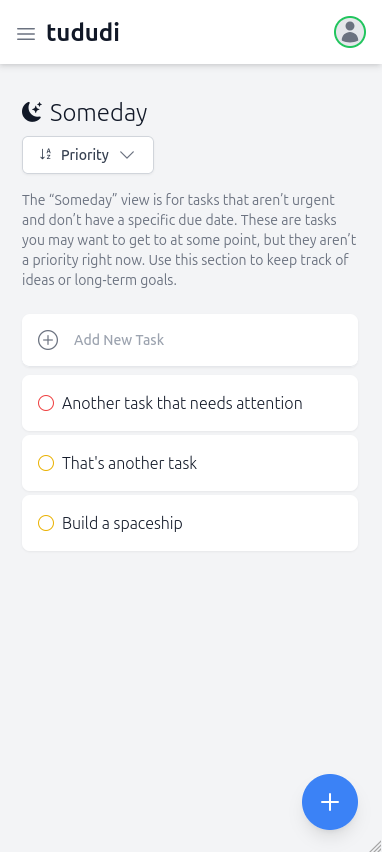
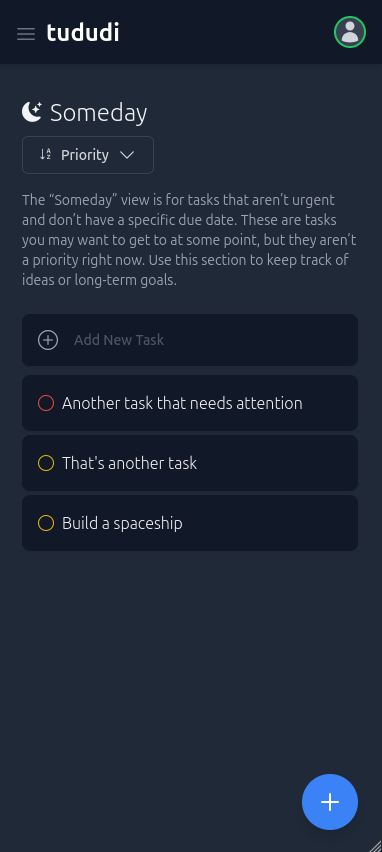
🚀 How It Works
This app allows users to manage their tasks, projects, areas, notes, and tags in an organized way. Users can create tasks, projects, areas (to group projects), notes, and tags. Each task can be associated with a project, and both tasks and notes can be tagged for better organization. Projects can belong to areas and can also have multiple notes and tags. This structure helps users categorize and track their work efficiently, whether they’re managing individual tasks, larger projects, or keeping detailed notes.
✨ Features
- Task Management: Create, update, and delete tasks. Mark tasks as completed and view them by different filters (Today, Upcoming, Someday). Order them by Name, Due Date, Date Created, or Priority.
- Quick Notes: Create, update, delete, or assign text notes to projects.
- Tags: Create tags for tasks and notes to enhance organization.
- Project Tracking: Organize tasks into projects. Each project can contain multiple tasks and/or multiple notes.
- Area Categorization: Group projects into areas for better organization and focus.
- Due Date Tracking: Set due dates for tasks and view them based on due date categories.
- Responsive Design: Accessible from various devices, ensuring a consistent experience across desktops, tablets, and mobile phones.
- Multi-Language Support: Available in multiple languages including English, German (de), Greek (el), Spanish (es), Japanese (jp), and Ukrainian (ua) among others.
- Telegram Integration:
- Create tasks directly through Telegram messages
- Receive daily digests of your tasks
- Quick capture of ideas and todos on the go
🗺️ Roadmap
Check out our GitHub Project for planned features and progress.
🛠️ Getting Started
One simple command, that's all it takes to run tududi with docker.
🐋 Docker
First pull the latest image:
docker pull chrisvel/tududi:latest
⚙️ Environment Variables
The following environment variables are used to configure tududi:
Required Variables:
TUDUDI_USER_EMAIL- Initial admin user's email address (e.g.,admin@example.com)TUDUDI_USER_PASSWORD- Initial admin user's password (use a strong password!)TUDUDI_SESSION_SECRET- Session encryption key (generate withopenssl rand -hex 64)
Optional Variables:
TUDUDI_INTERNAL_SSL_ENABLED- Set to 'true' if using HTTPS internally (default: false)TUDUDI_ALLOWED_ORIGINS- Controls CORS access for different deployment scenarios:- Not set: Only allows localhost origins
- Specific domains:
https://tududi.com,http://localhost:9292 - Allow all (development only): Set to empty string
""
Common Configuration Examples:
Local Development
export TUDUDI_USER_EMAIL=dev@local.test
export TUDUDI_USER_PASSWORD=devpassword123
export TUDUDI_SESSION_SECRET=$(openssl rand -hex 64)
export TUDUDI_INTERNAL_SSL_ENABLED=false
# TUDUDI_ALLOWED_ORIGINS not set - defaults to localhost only
Production with Reverse Proxy
export TUDUDI_USER_EMAIL=admin@yourdomain.com
export TUDUDI_USER_PASSWORD=your-secure-password-here
export TUDUDI_SESSION_SECRET=$(openssl rand -hex 64)
export TUDUDI_INTERNAL_SSL_ENABLED=true
export TUDUDI_ALLOWED_ORIGINS=https://tududi.yourdomain.com
🚀 Running with Docker
docker run \
  -e TUDUDI_USER_EMAIL=myemail@example.com \
  -e TUDUDI_USER_PASSWORD=mysecurepassword \
  -e TUDUDI_SESSION_SECRET=$(openssl rand -hex 64) \
  -e TUDUDI_INTERNAL_SSL_ENABLED=false \
  -e TUDUDI_ALLOWED_ORIGINS=https://tududi,http://tududi:9292 \
  -v ~/tududi_db:/usr/src/app/tududi_db \
  -p 9292:9292 \
  -d chrisvel/tududi:latest
Navigate to https://localhost:9292 and login with your credentials.
🚧 Development
Prerequisites
Before you begin, ensure you have the following installed:
- Ruby (version 3.2.2 or higher)
- Sinatra
- SQLite3
- Puma
- ReactJS
🏗 Installation
To install tududi, follow these steps:
- Clone the repository:
git clone https://github.com/chrisvel/tududi.git - Navigate to the project directory:
cd tududi - Install the required gems:
bundle install
🔒 SSL Setup
- Create and enter the directory:
mkdir certs cd certs - Create the key and cert:
openssl genrsa -out server.key 2048
openssl req -new -x509 -key server.key -out server.crt -days 365
📂 Database Setup
Execute the migrations:
rake db:migrate
👤 Create Your User
- Open the console:
rake console - Add the user:
User.create(email: "myemail@somewhere.com", password: "awes0meHax0Rp4ssword")
🚀 Usage
To start the application, run:
puma -C app/config/puma.rb
🔍 Testing
To run tests, execute:
bundle exec ruby -Itest test/test_app.rb
🤝 Contributing
Contributions to tududi are welcome. To contribute:
- Fork the repository.
- Create a new branch (`git checkout -b feature/AmazingFeature`).
- Make your changes.
- Commit your changes (`git commit -m 'Add some AmazingFeature'`).
- Push to the branch (`git push origin fexature/AmazingFeature`).
- Open a pull request.
📜 License
This project is licensed for free personal use, with consent required for commercial use. Refer to the LICENSE for further details.
📬 Contact
For questions or comments, please open an issue or contact the developer directly.
🌟 Please check my other projects!
- Reconya AI - Network reconnaissance and asset discovery tool
- BreachHarbor - Cybersecurity suite for digital asset protection
- Hevetra - Digital tracking for child health milestones
README created by Chris Veleris for tududi.