 257f2ff65d
New documentation:
- guide/search-tools-cheatsheet.md: Quick reference for Grep/Glob/Read tools
- guide/workflows/README.md: Workflows directory index
- examples/skills/ast-grep-patterns.md: AST-based code search patterns

Updated:
- guide/architecture.md: MCP architecture visual diagram section

Co-Authored-By: Claude <noreply@anthropic.com>
48 KiB
How Claude Code Works: Architecture & Internals
A technical deep-dive into Claude Code's internal mechanisms, based on official Anthropic documentation and verified community analysis.
Author: Florian BRUNIAUX | Contributions from Claude (Anthropic)
Reading time: ~25 minutes (full) | ~5 minutes (TL;DR only)
Last verified: January 2026 (Claude Code 3.3.x)
Source Transparency
This document combines three tiers of sources:
| Tier | Description | Confidence | Example |
|---|---|---|---|
| Tier 1 | Official Anthropic documentation | 100% | anthropic.com/engineering/* |
| Tier 2 | Verified reverse-engineering | 70-90% | PromptLayer analysis, code.claude.com behavior |
| Tier 3 | Community inference | 40-70% | Observed but not officially confirmed |
Each claim is marked with its confidence level. Always prefer official documentation when available.
TL;DR - 5 Bullet Summary
-
Simple Loop: Claude Code runs a
while(tool_call)loop — no DAGs, no classifiers, no RAG. The model decides everything. -
Eight Core Tools: Bash (universal adapter), Read, Edit, Write, Grep, Glob, Task (sub-agents), TodoWrite. That's the entire arsenal.
Search Strategy Evolution: Early Claude Code versions experimented with RAG using Voyage embeddings for semantic code search. Anthropic switched to grep-based (ripgrep) agentic search after internal benchmarks showed superior performance with lower operational complexity — no index sync required, no security liabilities from external embedding providers. This "Search, Don't Index" philosophy trades latency/tokens for simplicity/security. Community plugins (ast-grep for AST patterns) and MCP servers (Serena for symbols, grepai for RAG) available for specialized needs.
Source: Latent Space podcast (May 2025), ast-grep documentation
-
200K Token Budget: Context window shared between system prompt, history, tool results, and response buffer. Auto-compacts at ~75-92% capacity.
-
Sub-agents = Isolation: The
Tasktool spawns sub-agents with their own context. They cannot spawn more sub-agents (depth=1). Only their summary returns. -
Philosophy: "Less scaffolding, more model" — trust Claude's reasoning instead of building complex orchestration systems around it.
Visual Overview
Before diving into the technical details, this diagram by Mohamed Ali Ben Salem captures the essential architecture:
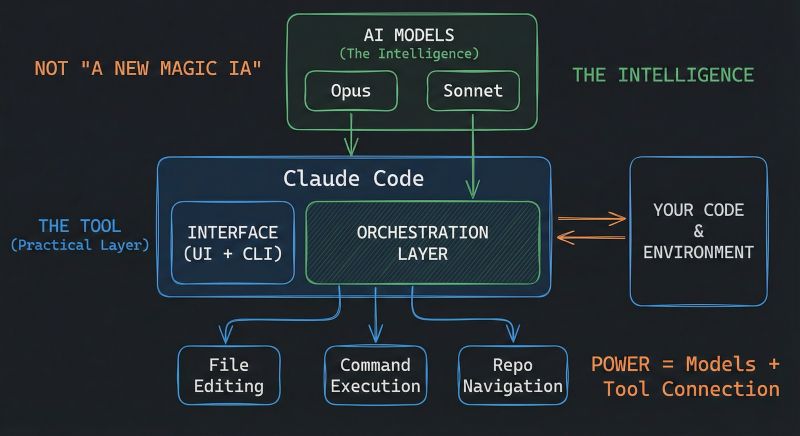
Source: Mohamed Ali Ben Salem on LinkedIn — Used with attribution
Key insight: Claude Code is NOT a new AI model — it's an orchestration layer that connects Claude (Opus/Sonnet/Haiku) to your development environment through file editing, command execution, and repository navigation.
Table of Contents
- The Master Loop
- The Tool Arsenal
- Context Management Internals
- Sub-Agent Architecture
- Permission & Security Model
- MCP Integration
- The Edit Tool: How It Actually Works
- Session Persistence
- Philosophy: Less Scaffolding, More Model
- Claude Code vs Alternatives
- Sources & References
- Appendix: What We Don't Know
1. The Master Loop
Confidence: 100% (Tier 1 - Official) Source: Anthropic Engineering Blog
At its core, Claude Code is remarkably simple:
┌─────────────────────────────────────────────────────────────┐
│                    CLAUDE CODE MASTER LOOP                  │
├─────────────────────────────────────────────────────────────┤
│                                                             │
│   ┌──────────────┐                                          │
│   │  Your Prompt │                                          │
│   └──────┬───────┘                                          │
│          │                                                  │
│          ▼                                                  │
│   ┌──────────────────────────────────────────────────────┐  │
│   │                                                      │  │
│   │                  CLAUDE REASONS                      │  │
│   │        (No classifier, no routing layer)             │  │
│   │                                                      │  │
│   └────────────────────────┬─────────────────────────────┘  │
│                            │                                │
│                            ▼                                │
│                   ┌────────────────┐                        │
│                   │  Tool Call?    │                        │
│                   └───────┬────────┘                        │
│                           │                                 │
│              YES          │           NO                    │
│         ┌─────────────────┴─────────────────┐               │
│         │                                   │               │
│         ▼                                   ▼               │
│  ┌────────────┐                      ┌────────────┐         │
│  │  Execute   │                      │   Text     │         │
│  │   Tool     │                      │  Response  │         │
│  │            │                      │   (DONE)   │         │
│  └─────┬──────┘                      └────────────┘         │
│        │                                                    │
│        ▼                                                    │
│  ┌─────────────┐                                            │
│  │ Feed Result │                                            │
│  │  to Claude  │──────────────────┐                         │
│  └─────────────┘                  │                         │
│                                   │                         │
│                                   ▼                         │
│                          ┌────────────────┐                 │
│                          │   LOOP BACK    │                 │
│                          │  (Next turn)   │                 │
│                          └────────────────┘                 │
│                                                             │
└─────────────────────────────────────────────────────────────┘
What This Means
The entire architecture is a simple while loop:
while (claude_response.has_tool_call):
    result = execute_tool(tool_call)
    claude_response = send_to_claude(result)
return claude_response.text
There is no:
- Intent classifier
- Task router
- RAG/embedding pipeline
- DAG orchestrator
- Planner/executor split
The model itself decides when to call tools, which tools to call, and when it's done. This is the "agentic loop" pattern described in Anthropic's engineering blog.
Why This Design?
- Simplicity: Fewer components = fewer failure modes
- Model-driven: Claude's reasoning is better than hand-coded heuristics
- Flexibility: No rigid pipeline constraining what Claude can do
- Debuggability: Easy to understand what happened and why
2. The Tool Arsenal
Confidence: 100% (Tier 1 - Official) Source: code.claude.com/docs
Claude Code has exactly 8 core tools:
| Tool | Purpose | Key Behavior | Token Cost |
|---|---|---|---|
Bash |
Execute shell commands | Universal adapter, most powerful | Low (command) + Variable (output) |
Read |
Read file contents | Max 2000 lines, handles truncation | High for large files |
Edit |
Modify existing files | Diff-based, requires exact match | Medium |
Write |
Create/overwrite files | Must read first if file exists | Medium |
Grep |
Search file contents | Ripgrep-based (regex), replaced RAG/embedding approach. For structural code search (AST-based), see ast-grep plugin. Trade-off: Grep (fast, simple) vs ast-grep (precise, setup required) vs Serena MCP (semantic, symbol-aware) | Low |
Glob |
Find files by pattern | Path matching, sorted by mtime | Low |
Task |
Spawn sub-agents | Isolated context, depth=1 limit | High (new context) |
TodoWrite |
Track progress | Structured task management | Low |
The Bash Universal Adapter
Key insight: Bash is Claude's swiss-army knife. It can:
- Run any CLI tool (git, npm, docker, curl...)
- Execute scripts
- Chain commands with pipes
- Access system state
The model has been trained on massive amounts of shell data, making it highly effective at using Bash as a universal adapter when specialized tools aren't enough.
Tool Selection Logic
Claude decides which tool to use based on the task. There's no hardcoded routing:
┌─────────────────────────────────────────────────────┐
│              TOOL SELECTION (Model-Driven)          │
├─────────────────────────────────────────────────────┤
│                                                     │
│  "Read auth.ts"           → Read tool               │
│  "Find all test files"    → Glob tool               │
│  "Search for TODO"        → Grep tool               │
│  "Run npm test"           → Bash tool               │
│  "Explore the codebase"   → Task tool (sub-agent)   │
│  "Track my progress"      → TodoWrite tool          │
│                                                     │
│  The model learns these patterns during training,   │
│  not from explicit rules.                           │
│                                                     │
└─────────────────────────────────────────────────────┘
Extended Tool Ecosystem
Beyond the 8 core tools, Claude Code can leverage:
MCP Servers (Model Context Protocol):
- Serena: Symbol-aware code navigation + session memory
- grepai: Semantic search + call graph analysis (Ollama-based)
- Context7: Official library documentation lookup
- Sequential: Structured multi-step reasoning
- Playwright: Browser automation and E2E testing
Community Plugins:
- ast-grep: AST-based structural code search (explicit invocation)
Search Tool Selection Matrix
Claude Code offers multiple ways to search code, each with specific strengths:
| Search Need | Native Tool | MCP/Plugin Alternative | When to Escalate |
|---|---|---|---|
| Exact text | Grep (ripgrep) |
- | Never (fastest) |
| Function name | Grep |
Serena find_symbol |
Multi-file refactoring |
| By meaning | - | grepai search |
Don't know exact text |
| Call graph | - | grepai trace_callers |
Dependency analysis |
| Structural pattern | - | ast-grep | Large migrations (>50k lines) |
| File structure | - | Serena get_symbols_overview |
Need symbol context |
Performance Comparison:
| Tool | Speed | Setup | Use Case |
|---|---|---|---|
| Grep (ripgrep) | ⚡ ~20ms | ✅ None | 90% of searches |
| Serena | ⚡ ~100ms | ⚠️ MCP | Refactoring, symbols |
| grepai | 🐢 ~500ms | ⚠️ Ollama + MCP | Semantic, call graph |
| ast-grep | 🕐 ~200ms | ⚠️ Plugin | AST patterns, migrations |
Decision principle: Start with Grep (fastest), escalate to specialized tools only when needed.
📖 Deep Dive: See Search Tools Mastery for comprehensive workflows combining all search tools.
3. Context Management Internals
Confidence: 80% (Tier 2 - Partially Official) Sources:
- platform.claude.com/docs (Tier 1)
- Observed behavior (Tier 2)
Claude Code operates within a fixed context window (200K tokens for Claude 3.5 Sonnet, varies by model).
Context Budget Breakdown
┌─────────────────────────────────────────────────────────────┐
│                 CONTEXT BUDGET (~200K tokens)               │
├─────────────────────────────────────────────────────────────┤
│                                                             │
│  ┌──────────────────────────────────────────────────────┐   │
│  │ System Prompt                            (~5-15K)    │   │
│  │ • Tool definitions                                   │   │
│  │ • Safety instructions                                │   │
│  │ • Behavioral guidelines                              │   │
│  ├──────────────────────────────────────────────────────┤   │
│  │ CLAUDE.md Files                          (~1-10K)    │   │
│  │ • Global ~/.claude/CLAUDE.md                         │   │
│  │ • Project /CLAUDE.md                                 │   │
│  │ • Local /.claude/CLAUDE.md                           │   │
│  ├──────────────────────────────────────────────────────┤   │
│  │ Conversation History                     (variable)  │   │
│  │ • Your prompts                                       │   │
│  │ • Claude's responses                                 │   │
│  │ • Tool call records                                  │   │
│  ├──────────────────────────────────────────────────────┤   │
│  │ Tool Results                             (variable)  │   │
│  │ • File contents from Read                            │   │
│  │ • Command outputs from Bash                          │   │
│  │ • Search results from Grep                           │   │
│  ├──────────────────────────────────────────────────────┤   │
│  │ Reserved for Response                    (~40-45K)   │   │
│  │ • Claude's thinking                                  │   │
│  │ • Generated code/text                                │   │
│  └──────────────────────────────────────────────────────┘   │
│                                                             │
│  USABLE = Total - System - Reserved ≈ 140-150K tokens       │
│                                                             │
└─────────────────────────────────────────────────────────────┘
Auto-Compaction
Confidence: 50% (Tier 3 - Conflicting reports)
When context usage exceeds a threshold, Claude Code automatically summarizes older conversation turns:
| Source | Reported Threshold |
|---|---|
| PromptLayer analysis | 92% |
| Community observations | 75-80% |
User-triggered /compact |
Anytime |
What happens during compaction:
- Older conversation turns are summarized
- Tool results are condensed
- Recent context is preserved in full
- The model receives a "context was compacted" signal
User control: Use /compact to manually trigger summarization before hitting limits.
Context Preservation Strategies
| Strategy | When to Use | How |
|---|---|---|
| Sub-agents | Exploratory tasks | Task tool for isolated search |
| Manual compact | Proactive cleanup | /compact command |
| Clear session | Fresh start needed | /clear command |
| Specific reads | Know what you need | Read exact files, not directories |
| CLAUDE.md | Persistent context | Store conventions in memory files |
Session Degradation Limits
Confidence: 70% (Tier 2 - Practitioner studies, arXiv research)
Claude Code's effectiveness degrades predictably under certain conditions:
| Condition | Observed Threshold | Symptom |
|---|---|---|
| Conversation turns | 15-25 turns | Loses track of earlier constraints |
| Token accumulation | 80-100K tokens | Ignores requirements stated early in session |
| Problem scope | >5 files simultaneously | Inconsistent changes, missed files |
Success rates by scope (from practitioner studies):
| Scope | Success Rate | Example |
|---|---|---|
| 1-3 files | ~85% | Fix bug in single module |
| 4-7 files | ~60% | Refactor feature across components |
| 8+ files | ~40% | Codebase-wide changes |
Mitigation strategies:
- Checkpoint prompts: "Before continuing, recap the current requirements and constraints."
- Session resets: Start fresh for new tasks (
/clear) - Scope tightly: Break large tasks into focused sub-tasks
- Use sub-agents: Delegate exploration to
Tasktool to preserve main context
4. Sub-Agent Architecture
Confidence: 100% (Tier 1 - Documented behavior) Source: code.claude.com/docs + System prompt (visible in tool definitions)
The Task tool spawns sub-agents for parallel or isolated work.
Isolation Model
┌─────────────────────────────────────────────────────────────┐
│                        MAIN AGENT                           │
│                                                             │
│  ┌───────────────────────────────────────────────────────┐  │
│  │ Context: Full conversation + all file reads           │  │
│  │                                                       │  │
│  │         Task("Explore authentication patterns")       │  │
│  │                        │                              │  │
│  │                        ▼                              │  │
│  │  ┌─────────────────────────────────────────────────┐  │  │
│  │  │             SUB-AGENT (Spawned)                 │  │  │
│  │  │                                                 │  │  │
│  │  │  • Own fresh context window                     │  │  │
│  │  │  • Receives: task description only              │  │  │
│  │  │  • Has access to: same tools (except Task)      │  │  │
│  │  │  • CANNOT spawn sub-sub-agents (depth = 1)      │  │  │
│  │  │  • Returns: summary text only                   │  │  │
│  │  │                                                 │  │  │
│  │  └─────────────────────────────────────────────────┘  │  │
│  │                        │                              │  │
│  │                        ▼                              │  │
│  │         Result: "Found 3 auth patterns: JWT in..."    │  │
│  │         (Only this text enters main context)          │  │
│  │                                                       │  │
│  └───────────────────────────────────────────────────────┘  │
│                                                             │
└─────────────────────────────────────────────────────────────┘
Why Depth = 1?
Limiting sub-agents to one level prevents:
- Recursive explosion: Agent-ception would consume infinite resources
- Context pollution: Each level would accumulate context
- Debugging nightmares: Tracking multi-level agent chains is hard
- Unpredictable costs: Nested agents = unpredictable token usage
Sub-Agent Types
Claude Code offers specialized sub-agent types via the subagent_type parameter:
| Type | Purpose | Tools Available |
|---|---|---|
Explore |
Codebase exploration | All read-only tools |
Plan |
Architecture planning | All except Edit/Write |
Bash |
Command execution | Bash only |
general-purpose |
Complex multi-step | All tools |
When to Use Sub-Agents
| Use Case | Why Sub-Agent Helps |
|---|---|
| Searching large codebases | Keeps main context clean |
| Parallel exploration | Multiple searches simultaneously |
| Risky exploration | Errors don't pollute main context |
| Specialized analysis | Different "mindset" for different tasks |
5. Permission & Security Model
Confidence: 100% (Tier 1 - Official) Sources:
Claude Code has a layered security model:
┌─────────────────────────────────────────────────────────────┐
│                    PERMISSION LAYERS                        │
├─────────────────────────────────────────────────────────────┤
│                                                             │
│  Layer 1: INTERACTIVE PROMPTS                               │
│  ┌────────────────────────────────────────────────────────┐ │
│  │ Claude wants to run: rm -rf node_modules               │ │
│  │ [Allow once] [Allow always] [Deny] [Edit command]      │ │
│  └────────────────────────────────────────────────────────┘ │
│                          │                                  │
│                          ▼                                  │
│  Layer 2: ALLOW/DENY RULES (settings.json)                  │
│  ┌────────────────────────────────────────────────────────┐ │
│  │ {                                                      │ │
│  │   "permissions": {                                     │ │
│  │     "allow": ["Bash(npm:*)", "Read(**)"],              │ │
│  │     "deny": ["Bash(rm -rf *)"]                         │ │
│  │   }                                                    │ │
│  │ }                                                      │ │
│  └────────────────────────────────────────────────────────┘ │
│                          │                                  │
│                          ▼                                  │
│  Layer 3: HOOKS (Pre/Post execution)                        │
│  ┌────────────────────────────────────────────────────────┐ │
│  │ PreToolUse: Validate before execution                  │ │
│  │ PostToolUse: Audit after execution                     │ │
│  │ PermissionRequest: Override permission prompts         │ │
│  └────────────────────────────────────────────────────────┘ │
│                          │                                  │
│                          ▼                                  │
│  Layer 4: SANDBOX MODE (Optional isolation)                 │
│  ┌────────────────────────────────────────────────────────┐ │
│  │ Filesystem isolation + Network restrictions            │ │
│  └────────────────────────────────────────────────────────┘ │
│                                                             │
└─────────────────────────────────────────────────────────────┘
Dangerous Pattern Detection
Confidence: 80% (Tier 2 - Observed but not exhaustive)
Claude Code appears to flag certain patterns for extra scrutiny:
| Pattern | Risk | Behavior |
|---|---|---|
rm -rf |
Destructive deletion | Always prompts |
sudo |
Privilege escalation | Always prompts |
curl | sh |
Remote code execution | Always prompts |
chmod 777 |
Insecure permissions | Always prompts |
git push --force |
History destruction | Always prompts |
DROP TABLE |
Data destruction | Always prompts |
This is not a complete blocklist — patterns are likely detected through model training rather than explicit rules.
Hooks System
Hooks allow programmatic control over Claude's actions:
{
  "hooks": {
    "PreToolUse": [
      {
        "matcher": "Bash",
        "hooks": [{
          "type": "command",
          "command": "/path/to/validate-command.sh"
        }]
      }
    ],
    "PostToolUse": [
      {
        "matcher": "*",
        "hooks": [{
          "type": "command",
          "command": "/path/to/audit-log.sh"
        }]
      }
    ]
  }
}
Hook capabilities:
| Capability | Supported | How |
|---|---|---|
| Block execution | Yes | Exit code != 0 |
| Modify parameters | Yes | Return modified JSON |
| Log actions | Yes | Write to file in hook |
| Async processing | No | Hooks are synchronous |
Hook JSON payload (passed via stdin):
{
  "event": "PreToolUse",
  "tool": "Bash",
  "params": {
    "command": "npm install lodash"
  },
  "sessionId": "abc123",
  "cwd": "/path/to/project"
}
→ Cross-reference: See Section 7 - Hooks in the main guide for complete examples.
6. MCP Integration
Confidence: 100% (Tier 1 - Official) Source: code.claude.com/docs/en/mcp
MCP (Model Context Protocol) servers extend Claude Code with additional tools.
MCP Architecture Overview
💡 Visual Guide: The following diagram illustrates how MCP creates a secure control layer between LLMs and real systems. The LLM layer has no direct data access - the MCP Server enforces security policies before tools can interact with databases, APIs, or files.

Figure 1: MCP Architecture showing separation between thinking (LLM), control (MCP Server), and execution (Tools). Design inspired by Dinesh Kumar's LinkedIn visualization, recreated under Apache-2.0 license.
Key security boundaries:
- Yellow layer (LLM): Reasoning only - No Data Access
- Orange layer (MCP Server): Security control point (policies, validation, logs)
- Grey layer (Real Systems): Protected data - Hidden From AI
How MCP Works (Technical Details)
┌─────────────────────────────────────────────────────────────┐
│                    MCP INTEGRATION                          │
├─────────────────────────────────────────────────────────────┤
│                                                             │
│  ┌─────────────────────────────────────────────────────┐    │
│  │                  CLAUDE CODE                        │    │
│  │                                                     │    │
│  │   Native Tools        MCP Tools                     │    │
│  │   ┌─────────┐        ┌─────────────────────────┐    │    │
│  │   │ Bash    │        │ mcp__serena__*          │    │    │
│  │   │ Read    │        │ mcp__context7__*        │    │    │
│  │   │ Edit    │        │ mcp__playwright__*      │    │    │
│  │   │ ...     │        │ mcp__custom__*          │    │    │
│  │   └─────────┘        └───────────┬─────────────┘    │    │
│  │                                  │                  │    │
│  └──────────────────────────────────┼──────────────────┘    │
│                                     │                       │
│                           JSON-RPC 2.0                      │
│                                     │                       │
│                                     ▼                       │
│  ┌─────────────────────────────────────────────────────┐    │
│  │                  MCP SERVER                         │    │
│  │                                                     │    │
│  │   stdio/HTTP transport                              │    │
│  │   Tool definitions (JSON Schema)                    │    │
│  │   Tool implementations                              │    │
│  │                                                     │    │
│  └─────────────────────────────────────────────────────┘    │
│                                                             │
└─────────────────────────────────────────────────────────────┘
Key MCP Facts
| Aspect | Behavior |
|---|---|
| Protocol | JSON-RPC 2.0 over stdio or HTTP |
| Tool naming | mcp__<server>__<tool> convention |
| Context sharing | Only via tool parameters and return values |
| Lifecycle | Server starts on first use, stays alive during session |
| Permissions | Same system as native tools |
What MCP Cannot Do
| Limitation | Explanation |
|---|---|
| Access conversation history | Only sees tool params, not full context |
| Maintain state across calls | Each call is independent (unless server implements caching) |
| Modify Claude's system prompt | Tools only, no prompt injection |
| Bypass permissions | Same security layer as native tools |
→ Cross-reference: See Section 8.6 - MCP Security for security considerations.
MCP Tool Search (Lazy Loading)
Confidence: 100% (Tier 1 - Official) Source: anthropic.com/engineering/advanced-tool-use
Since v2.1.7 (January 2026), Claude Code uses lazy loading for MCP tool definitions instead of preloading all tools into context. This is powered by Anthropic's Advanced Tool Use API feature.
The problem solved:
- MCP tool definitions consume significant context (e.g., GitHub MCP alone: ~46K tokens for 93 tools)
- Developer Scott Spence documented 66,000+ tokens consumed before typing a single prompt
- This "context pollution" limited practical MCP adoption
How Tool Search works:
┌─────────────────────────────────────────────────────────────┐
│                   MCP TOOL SEARCH FLOW                       │
├─────────────────────────────────────────────────────────────┤
│                                                             │
│  WITHOUT Tool Search (eager loading):                       │
│  ┌──────────────────────────────────────────────────────┐   │
│  │All 100+ tool definitions loaded upfront (~55K tokens)│   │
│  └──────────────────────────────────────────────────────┘   │
│                                                             │
│  WITH Tool Search (lazy loading):                           │
│  ┌──────────────────────────────────────────────────────┐   │
│  │ Step 1: Only search tool loaded (~500 tokens)        │   │
│  │ Step 2: Claude determines needed capability          │   │
│  │ Step 3: Tool Search finds matching tools (regex/BM25)│   │
│  │ Step 4: Only matched tools loaded (~600 tokens each) │   │
│  │ Step 5: Tool invoked normally                        │   │
│  └──────────────────────────────────────────────────────┘   │
│                                                             │
│  Result: 55K tokens → ~8.7K tokens (85% reduction)          │
│                                                             │
└─────────────────────────────────────────────────────────────┘
Measured improvements (Anthropic benchmarks):
| Metric | Before | After | Improvement |
|---|---|---|---|
| Token overhead (5-server setup) | ~55K | ~8.7K | 85% reduction |
| Opus 4 tool selection accuracy | 49% | 74% | +25 points |
| Opus 4.5 tool selection accuracy | 79.5% | 88.1% | +8.6 points |
Configuration (v2.1.9+):
# Environment variable
ENABLE_TOOL_SEARCH=auto      # Default (10% context threshold)
ENABLE_TOOL_SEARCH=auto:5    # Aggressive (5% threshold)
ENABLE_TOOL_SEARCH=auto:20   # Conservative (20% threshold)
ENABLE_TOOL_SEARCH=true      # Always enabled
ENABLE_TOOL_SEARCH=false     # Disabled (eager loading)
| Threshold | Recommended for |
|---|---|
auto:20 |
Lightweight setups (5-10 tools) |
auto:10 |
Balanced default (20-50 tools) |
auto:5 |
Power users (100+ tools) |
→ As Simon Willison noted: "Context pollution is why I rarely used MCP. Now that it's solved, there's no reason not to hook up dozens or even hundreds of MCPs to Claude Code." — X/Twitter, January 14, 2026
7. The Edit Tool: How It Actually Works
Confidence: 90% (Tier 2 - Verified through behavior) Sources:
- Observed behavior
- github.com/cline/cline/issues/2909 (similar implementation)
The Edit tool is more sophisticated than it appears.
Edit Algorithm
┌─────────────────────────────────────────────────────────────┐
│                     EDIT TOOL FLOW                          │
├─────────────────────────────────────────────────────────────┤
│                                                             │
│  Input: old_string, new_string, file_path                   │
│                                                             │
│         ┌──────────────────────────────────────┐            │
│         │ Step 1: EXACT MATCH                  │            │
│         │ Search for literal old_string        │            │
│         └────────────────┬─────────────────────┘            │
│                          │                                  │
│              Found?  ────┴────  Not found?                  │
│                │                     │                      │
│                ▼                     ▼                      │
│         ┌──────────┐         ┌──────────────────┐           │
│         │ REPLACE  │         │ Step 2: FUZZY    │           │
│         │  (done)  │         │ MATCH            │           │
│         └──────────┘         └────────┬─────────┘           │
│                                       │                     │
│                           Found?  ────┴────  Not found?     │
│                             │                     │         │
│                             ▼                     ▼         │
│                      ┌──────────┐         ┌──────────────┐  │
│                      │ REPLACE  │         │    ERROR     │  │
│                      │ + WARN   │         │  (mismatch)  │  │
│                      └──────────┘         └──────────────┘  │
│                                                             │
└─────────────────────────────────────────────────────────────┘
Fuzzy Matching Details
When exact match fails, the Edit tool attempts:
- Whitespace normalization: Ignore trailing spaces, normalize indentation
- Line ending normalization: Handle CRLF vs LF differences
- Context expansion: Use surrounding lines to locate the right spot
If fuzzy matching also fails, the tool returns an error asking Claude to verify the old_string.
Edit Validation
Before applying changes, the Edit tool:
| Check | Purpose |
|---|---|
| File exists | Prevent creating files via Edit |
| old_string found | Ensure we're editing the right place |
| Single match | old_string must be unique (or use replace_all) |
| New content differs | Prevent no-op edits |
When Edit Fails
| Error | Cause | Claude's Response |
|---|---|---|
| "old_string not found" | Content changed since last read | Re-reads file, tries again |
| "Multiple matches" | old_string isn't unique | Uses more context lines |
| "File not found" | Wrong path | Searches for correct path |
8. Session Persistence
Confidence: 100% (Tier 1 - Official) Source: code.claude.com/docs
Sessions can be resumed across terminal sessions.
Resume Mechanisms
| Command | Behavior |
|---|---|
claude --continue / claude -c |
Resume most recent session |
claude --resume <id> / claude -r <id> |
Resume specific session by ID |
What Gets Persisted
| Persisted | Not Persisted |
|---|---|
| Conversation history | Live tool state |
| Tool call results | Pending operations |
| Session ID | File locks |
| Working directory context | Environment variables |
Storage Format
Confidence: 50% (Tier 3 - Inferred)
Sessions appear to be stored as JSON/JSONL files in ~/.claude/ but:
- Format is not publicly documented
- Not intended as a stable API
- May change between versions
Do not rely on session file format for external tooling.
9. Philosophy: Less Scaffolding, More Model
Confidence: 100% (Tier 1 - Official) Source: Daniela Amodei (Anthropic CEO) - Public statements
The core philosophy behind Claude Code:
"Do more with less. Smart architecture choices, better training efficiency, and focused problem-solving can compete with raw scale."
What This Means in Practice
| Traditional Approach | Claude Code Approach |
|---|---|
| Intent classifier → Router → Specialist | Single model decides everything |
| RAG with embeddings | Grep + Glob (regex search) |
| DAG task orchestration | Simple while loop |
| Tool-specific planners | Model-driven tool selection |
| Complex state machines | Conversation as state |
| Prompt engineering frameworks | Trust the model |
Why It Works
- Model capability: Claude 3.5+ is capable enough to handle routing decisions
- Reduced latency: Fewer components = faster response
- Simpler debugging: When something fails, there's one place to look
- Better generalization: No hand-coded rules to break on edge cases
The Trade-offs
| Advantage | Disadvantage |
|---|---|
| Simplicity | Less fine-grained control |
| Flexibility | Harder to enforce strict behaviors |
| Fewer bugs | Model errors affect everything |
| Fast iteration | Requires good model quality |
10. Claude Code vs Alternatives
Confidence: 70% (Tier 3 - Based on public information) Sources: Various 2024-2025 comparisons, official documentation
| Dimension | Claude Code | GitHub Copilot Workspace | Cursor | Amazon Q Developer |
|---|---|---|---|---|
| Architecture | while(tool) loop | Cloud-based planning | Event-driven + cloud | AWS-integrated agents |
| Execution | Local terminal | Cloud sandbox | Local + cloud | Cloud/local hybrid |
| Model | Claude (single) | GPT-4 variants | Multiple (adaptive) | Amazon Titan + others |
| Context | ~200K tokens | Limited | Limited | Varies |
| Transparency | High (visible reasoning) | Medium | Medium | Low |
| Customization | CLAUDE.md + hooks | Limited | Plugins | AWS integration |
| MCP Support | Native | No | Some servers | No |
| Pricing | Pro/Max tiers | GitHub subscription | Per-seat | AWS-integrated |
When to Choose Claude Code
| Scenario | Claude Code | Alternative |
|---|---|---|
| Deep codebase exploration | Excellent | Good |
| Terminal-native workflow | Excellent | Limited |
| Custom automation (hooks) | Excellent | Limited |
| Team standardization | Good (CLAUDE.md) | Varies |
| IDE integration | Limited (VS Code ext) | Cursor/Copilot better |
| Enterprise compliance | Via Anthropic enterprise | Varies |
11. Sources & References
Tier 1 - Official Anthropic
| Source | URL | Topics |
|---|---|---|
| Engineering Blog | anthropic.com/engineering/claude-code-best-practices | Master loop, philosophy |
| Setup Docs | code.claude.com/docs/en/setup | Tools, commands |
| Context Windows | platform.claude.com/docs/en/build-with-claude/context-windows | Token limits |
| Hooks Reference | code.claude.com/docs/en/hooks | Hook system |
| Hooks Guide | code.claude.com/docs/en/hooks-guide | Hook examples |
| MCP Docs | code.claude.com/docs/en/mcp | MCP integration |
| Sandboxing | code.claude.com/docs/en/sandboxing | Security model |
Tier 2 - Verified Analysis
| Source | URL | Topics |
|---|---|---|
| PromptLayer Analysis | blog.promptlayer.com/claude-code-behind-the-scenes-of-the-master-agent-loop/ | Internal architecture |
| Steve Kinney Course | stevekinney.com/courses/ai-development/claude-code-* | Permissions, sessions |
Tier 3 - Community Resources
| Source | Topics |
|---|---|
| GitHub Issues (anthropics/claude-code) | Edge cases, bugs, feature discussions |
| Reddit r/ClaudeAI | User experiences, workarounds |
| YouTube tutorials | Visual walkthroughs |
12. Appendix: What We Don't Know
Transparency about gaps in our understanding:
Unknown or Unconfirmed
| Topic | What We Don't Know | Confidence in Current Understanding |
|---|---|---|
| Exact compaction threshold | Is it 75%? 85%? 92%? Varies by model? | 40% |
| System prompt contents | Full text not public, varies by model version | 30% |
| Token counting method | Exact tokenizer, overhead for tool schemas | 50% |
| Model fallback | Does Claude Code fallback if a model fails? | 20% |
| Internal caching | Is there result caching between sessions? | 20% |
| Rate limiting logic | How rate limits are applied per-tool | 40% |
Explicitly Undocumented
These are intentionally not documented by Anthropic:
- Session file format (internal implementation detail)
- System prompt variations between models
- Internal component names/architecture
- Token usage breakdown per component
- Exact permission evaluation order
How to Stay Updated
- Official changelog: Watch anthropic.com/changelog
- GitHub releases: github.com/anthropics/claude-code/releases
- Community Discord: Various Claude-focused servers
- This guide: Updated periodically based on verified information
Contributing
Found an error? Have verified new information? Contributions welcome:
- For official facts: Cite the Anthropic source
- For observations: Describe how you verified the behavior
- For corrections: Explain what's wrong and why
Last updated: January 2026 Claude Code version: 3.3.x Document version: 1.0.0